How to Use Barbie Fonts in Cricut Design Space (Step-by-Step)
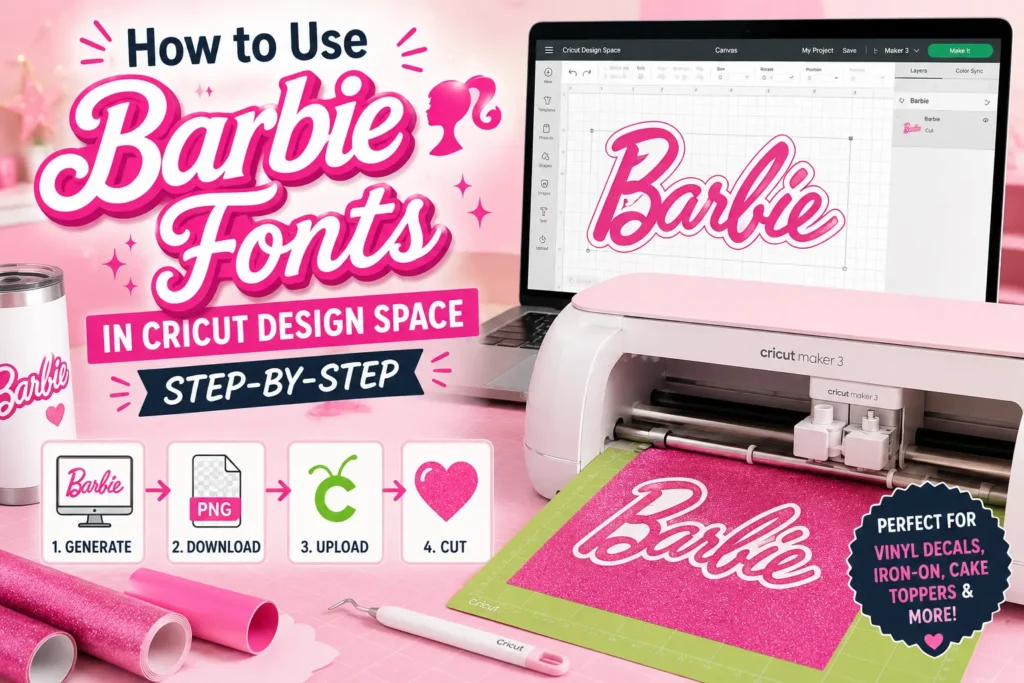
Cricut Design Space doesn’t have a Barbie font preloaded either, which is why most crafters generate the design as an image first, then bring it in for cutting. This workflow works for vinyl decals, iron-on transfers, cake toppers, and gift tags alike.
What You’ll Need
A Cricut machine, Cricut Design Space (desktop or app), and a generated PNG design — no font files or installation needed.
Generate Your Design
Open the Barbie Font Generator and type your text. Pick a style — script, bubble, retro, or movie-inspired — based on the project you’re making.
Download a Transparent PNG
Adjust colors and effects if needed, then export your design as a transparent PNG.
Tip: For cutting purposes, a simple, high-contrast color often traces more cleanly than a multi-color gradient. Keep this in mind if your design is headed straight to vinyl.
Import Into Cricut Design Space
In Design Space, select “Upload”, choose “Upload Image”, and select your PNG.
Cricut will let you choose between a simple, complex, or vector trace depending on how clean the edges of your design are.
Prepare for Cutting or Printing
Resize the image to fit your project, mirror it if you’re using iron-on vinyl, and assign your material settings before sending it to the machine. From here, it’s the same process as any other Cricut cut file.
Project Ideas for Cricut
Barbie-style name decals work especially well on tumblers, party banners, cake toppers, and gift tags.
Tumblers
Create personalized name decals for drinkware and gifts.
Party Banners
Design custom decorations for birthdays and themed events.
Cake Toppers
Cut decorative toppers for cakes, cupcakes, and desserts.
Gift Tags
Add a personalized touch to presents and party favors.
Looking for More Inspiration?
For more themed ideas across both digital and physical projects, explore our collection of creative Barbie-inspired project ideas.
Explore 20 Barbie Font Ideas →Related: Using Barbie Fonts in Canva
If you’d rather keep your design fully digital, for invitations, social graphics, or printables, the same exported PNG also drops directly into Canva.
Continue with the Canva Workflow
Learn how to upload your Barbie-style logo into Canva, place it on templates, create invitations, social media graphics, printable designs, and more.
Read the Canva Guide →